This single strategic upgrade not only eliminates the recurring expense of replacing lost plastic cards—often costing over $50 per user in labor and materials—but also closes the critical security gap caused by easily cloned legacy fobs. This guide breaks down the technology to help you secure your authorized access points with confidence.
|
In the realm of modern commercial security systems, the traditional metal key is rapidly becoming a liability rather than an asset. Access control credentials—whether they take the form of proximity cards, key fobs, or biometrics—serve as the digital gatekeepers of your facility, offering a level of auditability and control that mechanical locks simply cannot match. While most administrators focus on the hardware on the wall, the true industry "efficiency hack" lies in the credential itself: shifting from static physical tokens to dynamic mobile credentials.
This single strategic upgrade not only eliminates the recurring expense of replacing lost plastic cards—often costing over $50 per user in labor and materials—but also closes the critical security gap caused by easily cloned legacy fobs. This guide breaks down the technology to help you secure your authorized access points with confidence. Securing a modern workplace requires more than just locking doors; it demands a strategic approach to infrastructure and traffic flow. Executing the correct access control installation steps is critical for ensuring seamless commercial security integration and long-term operational efficiency.
While many facility managers focus solely on selecting sleek card readers, the true industry secret to a scalable system lies in the "unified cabling" phase—a foundational planning hack that consolidates data and power infrastructure to prevent costly retrofits down the road. This guide provides a comprehensive roadmap to planning, wiring, and deploying a robust system that protects your assets while ensuring effortless compliance. Is "shrinkage" eating your profits? Effective retail theft prevention requires more than just watching customers. We reveal a layout "hack" that eliminates blind spots and combine it with modern retail loss prevention strategies like AI surveillance. Stop thieves before they walk out the door.
Curious how a single cable can cut installation time, trim costs, and make your security camera system more reliable?
In the past, installing a security camera meant running two separate lines: one for the video signal and one for electricity. This often required hiring an electrician to install new outlets near every camera location, driving up costs and complexity. Power over Ethernet (PoE) changed everything. By carrying both DC power and high-definition data on a single Ethernet line, installers can skip the outlet hunt and messy wiring. This single-run approach dramatically speeds up deployment while keeping maintenance simple. This guide explains exactly why PoE is the superior choice for modern surveillance, how it works, and how to plan your own PoE camera installation. Key Takeaways
Convert Old Intercom System: NYC Building Guide for Property Managers & Co-op/Condo Boards12/27/2025
If you’re trying to convert an old intercom system, you’re probably not doing it because you love tech upgrades. You’re doing it because the current system is costing you time: missed deliveries, resident complaints, constant “buzz me in” calls, and an entry door that feels harder to control. In New York City (and across NY), the smartest conversion plan isn’t “buy a new panel and hope.” It’s a structured decision: retrofit vs. replace vs. relocate, based on wiring health, building layout, and how your residents actually use the front door.
This guide breaks down how to convert an older intercom into a modern, reliable entry system—without wasting money on the wrong approach. It’s written for property management companies, co-op boards, and condo boards who need a plan that is practical, board-approvable, and low-disruption for occupied buildings. Key Takeaways
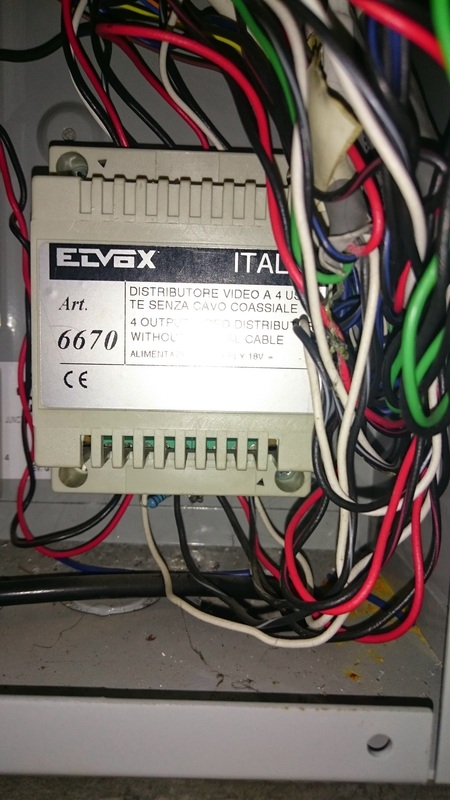
If you own a brownstone in Brooklyn or manage a co-op in Queens, you likely have a "relic" in your wall. It might be a yellowing plastic Nutone master station from the 90s, or a brass Lee Dan panel that buzzes loudly every time it rains.
You want to upgrade to a modern video system, but you’re stuck. You’ve read forums on Reddit suggesting you "just iPad mount it" (which doesn't work for multi-tenant buildings), or you’ve been told by contractors that you need to rip open every wall to run CAT6 ethernet cable. Here is the truth: You can upgrade to video without rewiring. At 365 Security Solution, we specialize in the professional retrofit of legacy systems. Here is how we turn 30-year-old copper into modern security.
As a small business owner, you often feel like you need eight arms. You are not just the CEO; you are the inventory manager, the customer service rep, the HR department, and occasionally, the janitor. Most productivity advice found online is written for people who sit at a desk all day. They tell you to "turn off notifications" or "install a browser blocker." But when you manage a physical business—a retail store, a warehouse, or a property—you can’t just go offline. If a shipment arrives or a pipe bursts, you need to know. Real productivity tips for small business owners in the physical world aren't about doing more work in less time; they are about operational leverage. Here are 7 practical strategies to reclaim 10+ hours of your week, specifically designed for owners with boots on the ground. We have all met the business owner who claims to work 80 hours a week but never seems to get ahead. They are the first one in, the last one out, and they touch every single receipt, email, and decision that moves through their company.
This isn't dedication; it’s a trap. Working in your business instead of on your business is the fastest route to stagnation. True workplace efficiency isn't about moving faster or skipping lunch breaks. It is about removing friction, automating the mundane, and trusting your systems so you can focus on growth. In this guide, we will explore five actionable strategies to reclaim your time—including how modern technology, like remote monitoring, allows you to be in two places at once. You have likely seen the headlines or the viral videos: a hooded figure walks up to a front porch, presses a button on a small device, and the video doorbell goes black. No notification is sent. No video is recorded. The package—or the car in the driveway—is gone without a trace.
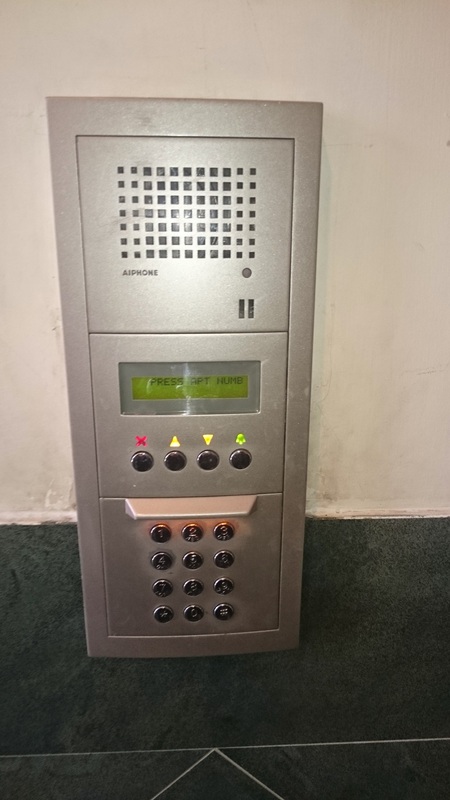
As "Smart Home" wireless security cameras from brands like Ring, Nest, and Blink have exploded in popularity, so has the technology used to defeat them. The tool of choice for modern burglars is the WiFi Jammer. But what exactly is this device, how does it disable your security, and why are professional hardwired cameras the only true defense against it? The "Smart Tech" Challenger vs. The "Old Reliable" ChampionIf you manage a building in New York City, you are likely facing a common dilemma: Do you stick with the proven, "tank-like" reliability of Aiphone, or do you leap into the future with the feature-rich, facial-recognition technology of Akuvox? It is not just a choice between two brands; it is a choice between two different philosophies. At 365 Security Solution, we install and service both systems across Brooklyn, Manhattan, and Queens. We have seen firsthand how they perform in real-world NYC conditions—from freezing winters to high-traffic delivery days. This guide breaks down the pros, cons, and hidden costs of each to help your Co-op Board or management team decide.
With video doorbells, cloud platforms, and mobile apps everywhere, many building owners ask the same question: Do simple audio intercoms still make sense, or are they outdated? Surprisingly, the answer is yes—intercom-only (audio-only) systems can still be a smart choice in the right situations. They’re not obsolete; they just serve a different role than feature-heavy video and mobile systems. For certain doors and certain buildings, a well-installed audio intercom delivers:
This guide explains when intercom-only systems still work well, where they fall short, and how to decide if audio-first or video/IP is better for your property. Key Takeaways
The Ultimate Guide to Commercial Security Camera Installation: Protect Your Business the Right WayWhat if a well-designed surveillance system could prevent losses, improve safety, and deliver the evidence you need when incidents occur? This guide provides a complete, practical roadmap for commercial security camera installation, from planning and equipment selection to installation, compliance, and maintenance. Whether you're managing a small retail shop or a large enterprise facility, this guide helps you make smart, informed decisions that protect your business while aligning with industry standards and budgets. We’ll break down different camera systems—DVR-based, IP with AI features, and explore trusted brands You’ll also find timelines, planning checklists, and U.S. compliance considerations to guide your implementation. Can a single camera style truly cover a campus, a retail floor, and a loading dock with equal effectiveness?
365 Security Solution walks readers through practical differences in real use: placement, field of view, and how VMS handles stitching, dewarping, or operator control. The right choice depends on where a device is mounted, how much detail you need at distance, and whether live operators must direct zoom in an incident. Expect a comparison of persistent wide coverage, compact ultra‑wide designs, and motorized zoom units. We’ll examine coverage gaps, distortion, playback clarity, zoom quality, and total cost of ownership so you can match a camera type to operational needs and long‑term reliability. Key Takeaways
Are you tired of changing batteries in your "smart" doorbell or seeing "Connection Lost" messages on your phone right when you need to check your security feed? At 365 Security Solution, we believe your security system should be the most reliable part of your property. That is why we specialize exclusively in professional wired security camera installations for homes and businesses across New York. If you are looking for local wired security camera installers who understand the unique infrastructure of NYC and Long Island properties, you have found the right team. [Get Your Free Quote Now] Imagine if you bought a lamp for your living room, but the manufacturer told you that you could only buy lightbulbs from them—forever. And if that manufacturer went out of business, your lamp would stop working. That sounds ridiculous, but it is exactly what happens with many "smart" security cameras on the market today. You buy a camera, and you are trapped in that company's ecosystem (often paying monthly subscription fees just to see your own footage). At 365 Security Solution, we believe you should own your security system, not rent it. That is why we specialize in installing ONVIF-compliant camera systems for our New York clients. But what exactly does that mean for you? Can a change in compression really cut months of storage costs and make remote viewing smoother for your surveillance setup?
365 Security Solution breaks down how three leading formats affect video quality, storage needs, and network load in U.S. camera systems. Since HEVC became standard in 2016, many sites saw file sizes drop by about half at the same visual quality. That matters most at higher resolutions like 4K, where older formats often require near 8 Mbps per stream while newer formats commonly sit around 4–6 Mbps. Lower bitrates mean more days of footage on the same drive and room for extra cameras on a network. But smarter compression demands more processing power and can raise playback or compatibility hurdles on some players and PCs. This article compares core technology, real-world storage math, and compatibility trade-offs so you can match the right format to your systems and budget. Key Takeaways
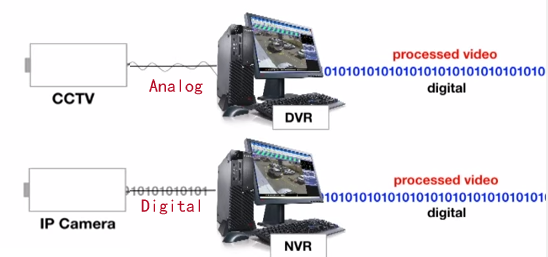
The short answer: a network video recorder acts as a central device that receives, stores, and manages video streams from IP cameras over Ethernet. It records to local hard drives and often to cloud folders, using efficient codecs like H.264 and H.265 to save storage while preserving high-resolution footage.
Today’s nvr units support multiple channels, remote access via VMS/IVMS, and analytics that help detect motion or faces. They tie into alarms and access control to boost surveillance and overall security for homes and businesses. This guide will explain core features, network basics, storage planning, and compatibility checks. It also flags trade-offs like cost and dependence on network uptime so users approach deployment with realistic expectations. By the end, you’ll have practical information to choose, set up, and optimize an nvr solution that fits your scale and goals. Key Takeaways
Can a surveillance system still catch critical footage when your home network is offline?
The short answer is no, security cameras do not require the internet to work. While most modern IP cameras rely on the internet for features like remote viewing and push notifications, the core function of recording video can be performed entirely offline. Many reliable security systems operate on "closed" loops (CCTV) or use local storage methods like microSD cards, DVRs, and NVRs. In fact, keeping your security cameras offline can sometimes offer better privacy and protection against remote hacking. This guide will walk you through exactly how security cameras work without the internet, the pros and cons of offline systems, and how to set up a surveillance network that doesn't rely on WiFi. Key Takeaways
Can One Cable Really Do It All?
Is it possible to power a security camera and transmit data using just one Ethernet cable? Thanks to Power over Ethernet (PoE) technology, the answer is yes — and it’s changing how modern surveillance systems are installed and scaled. This guide explains how PoE enables power and data to travel through a single Ethernet cable, simplifying installations, reducing costs, and improving the reliability of IP camera networks. Whether you're setting up a home system or planning a commercial deployment, understanding how PoE works will help you make smarter decisions. Does your lobby slow guests and delivery drivers down? Modern door buzzer entry setups can cut delays and boost safety at every entrance.
365 Security Solution designs and installs tailored entry Access Control systems across New York . We combine keypad, intercom, card/fob readers, and electromagnetic locks so authorized people enter smoothly while unauthorized attempts stop at the door. Today's buzzer technology adds video, audio verification, remote unlock, and audit trails. Integrations with CCTV and video management give staff better situational awareness and clearer decision paths. Whether your property needs wired or wireless parts, multi-tenant features, or routine maintenance plans, a thoughtfully planned entry system reduces bottlenecks and improves operational convenience and safety. Key Takeaways
Curious how a modern access control setup can change daily security and flow at a workplace? This guide starts by defining the core idea: a setup that grants or denies entry to buildings, rooms, or areas using electronic locks, readers, and a decision hub.
Users present credentials like key cards or mobile IDs to a reader. The reader asks a controller or server, which then approves or blocks entry and logs the event for later review. Administrators set rules by shift, job role, or time to match policy needs. The physical parts—electric locks, readers, panels—work with software hosted on-premises, in cloud services, or embedded at the edge. Together they enforce both physical entry rules and logical rules for apps and networks. Later sections map components to outcomes: lower risk, easier compliance, better productivity, and clearer data for investigations and planning. Identity plays a central role, so policies stay consistent across doors and digital resources. Key Takeaways
Ready for a smarter entry setup, but unsure which early moves matter most?
This short guide outlines planning steps that save time and money. Design, wiring, hardware fit, configuration, and testing form the full lifecycle. Small projects may finish in hours. Larger, multi‑door rollouts can take days or weeks. Budget ranges often start near $1,500 and climb past $5,000 per door based on scope and hardware. Credential choices include keycards, PINs, mobile tokens, and biometrics. Regulatory checks are crucial. Plan reader and lock placement for NFPA 101 egress, ADA reach rules, and UL 294 device needs. Verify local building and fire codes early, and select certified installers who follow manufacturer diagrams and best practices. Key Takeaways
Could a single, well-planned setup change how residents, staff, and visitors move through your building?
This introduction outlines the full scope of a modern security project from the first site survey to final turnover. Professional installers pick hardware, map doors, and prepare power and network paths before any wiring begins. Technicians run cabling, mount electric locks, and fit readers, keypads, and controllers to meet safety and code. They then configure users, roles, schedules, and logs so daily use matches your policy. Integration with video, intercoms, and alarms makes the control system part of a wider security strategy. The team trains staff, hands over manuals, and provides support contacts so the system runs smoothly over time. Key Takeaways
Curious whether a modern access control approach will cut costs, speed response, and actually reduce risk at your building?
This buyer’s guide helps match risk profile, budget, and daily workflows with the right system architecture. Electronic entry tech moved from niche to mainstream in the past decade, and today’s solutions mix cloud tools, mobile credentials, and AI-informed monitoring. We show how to weigh single-door readers versus networked controllers, choose credential types, and decide on serverless or on-prem deployments. The goal isn’t feature bloat but a reliable set of tools that secure doors while enabling centralized oversight and audit trails. Follow a clear decision path: assess environment and needs, compare hardware and credentials, pick a deployment model, and verify integrations with video and alarms. This practical approach moves you from research to a confident short list. Key Takeaways
Curious how a single device turns a weak mixer output into clear audio across a hotel, restaurant, or office
The answer challenges myths about loudness and reveals why power, signal handling, and protection matter more than raw volume. The signal path starts at inputs and processing, then moves to the unit that boosts voltage and current so installed speakers deliver consistent output. Proper gain, headroom, and impedance matching preserve sound quality and cut distortion in noisy areas. Multi-channel designs enable zoning so lobbies, dining rooms, and corridors get tailored levels, helping operators balance comfort and intelligibility while planning price and service life. Key Takeaways
|
365 Security SolutionWe Are Licensed Security System Installation And Services Company In NY Archives
January 2026
Categories
All
|
RSS Feed